

Four new WhatsApp group chat features make it easier to find what matters in a busy conversation: permanent pins, message history for someone who has already joined, status updates for a single group, and a filter for mentions and replies.
WhatsApp announced the changes on 29 October. It has not given a date when every account will receive them, so an updated app may still be missing an option for now.
Four new WhatsApp group chat features
| Feature | What it does | Best for |
| Pin messages forever | Keeps a pinned message at the top of the chat with no time limit | Addresses, rules, payment details, schedules |
| Send history after joining | Shares recent messages with someone already in the group | People who joined through an invite link |
| Group status | A status only that group’s members can see, gone after 24 hours | Clubs, classes, close friend circles |
| Mentions and replies filter | Shows unread groups where you were @mentioned, replied to, or tagged with @all | Anyone in lots of active groups |
Pin messages with no time limit
Pinned messages arrived in December 2023 with three durations: 24 hours, 7 days or 30 days. WhatsApp later raised the limit to three pinned messages per chat, but the expiry stayed. A pinned address or set of group rules quietly unpinned itself after a month, and someone had to remember to pin it again.
Now you can keep a message pinned forever if you would rather not choose a time limit up front. The process is the same as before:
- Open the chat and long-press the message you want to pin.
- On Android, tap More options (the three dots), then Pin. On iPhone, tap More options, then Pin.
- Choose how long it stays pinned. Pick the new option with no time limit if you want it to stay until someone unpins it.
- Tap Pin to confirm.
In groups, admins decide whether everyone or only admins can pin. If your group has a habit of pinning memes, switching that permission to admins only keeps the three pin slots for messages that matter.
Send message history after someone joins
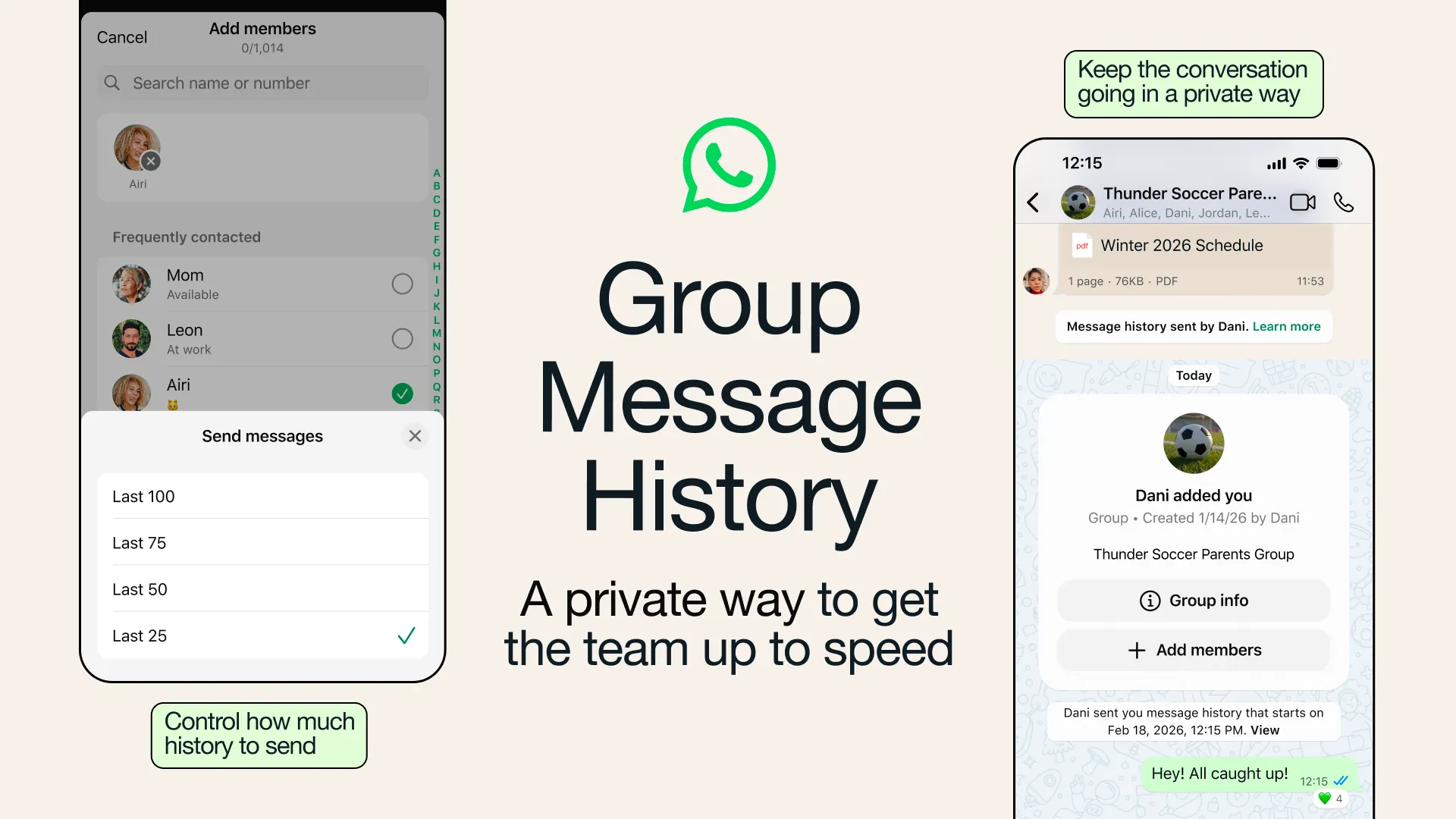
Group Message History launched in February 2026. When you add someone to a group, you can toggle on an option to send them recent messages, between 25 and 100, so they can catch up without anyone forwarding screenshots. The gap was people who joined on their own through an invite link. They arrived with an empty chat.
Now you can send history after the fact. When someone joins, the system message in the chat shows their name with a Send message history option. Tap their name, choose how many recent messages to share, and send. According to WhatsApp’s Help Center:
- All pinned messages are included along with the recent messages you choose. That fixes an old quirk where new members could not see messages pinned before they joined.
- The new member gets a notification, and everyone in the group sees a system message saying history was sent, with the sender’s name and timestamps.
- Shared history looks visually different from regular messages, so nobody mistakes old messages for new ones.
- History stays end-to-end encrypted, like all personal chats.
- Messages that have already disappeared, live location, view once media and business transactions are not sent.
Admins can always send history, and they can turn off Send message history for members in the group permissions. One detail to keep in mind: if the new member reports something from the history you sent, WhatsApp says the person who sent the history is the one reported. Check what is in the last 100 messages before you share them with a stranger who joined through a public link.
Group status: a status only one group can see
Regular status goes to your contacts, filtered by your privacy settings. Group status is narrower. You share it with the members of one group, and everyone in that group can view it, react to it and add their own. Like any status, it disappears after 24 hours.
WhatsApp’s example is a running club: race photos belong with the club, not with your relatives. The same applies to a college batch group, an office cricket team or a building society. WhatsApp has not published step-by-step instructions for group status yet, so look for the status option inside the group once the feature reaches your account.
Keep in mind that group status is visible to every member, including people you have never saved as contacts. In a large group, that can be a lot of strangers.
Filter chats by mentions and replies
This is the feature heavy WhatsApp users will notice most. A new Mentions and replies filter sits with the existing chips at the top of the Chats tab, next to filters like Groups. Tap it and WhatsApp shows only unread group conversations where someone @mentioned you, replied directly to your message, or used @all to notify the whole group.
If you are in a dozen family, society and work groups, this turns “200 unread” into the five chats that need you. Mentions also carry an @ badge in the chat list, so they are easy to spot even without the filter.
The @all mention itself arrived in August 2026. In groups with more than 32 members only admins can use it, and you can mute @all alerts in a group’s notification settings if a group overuses it.
Older group tools worth using
WhatsApp used the announcement to point out a few existing tools that many people miss:
- Reply privately: long-press a group message and reply to that person in a one-on-one chat, so a side conversation doesn’t take over the group.
- Single-answer polls: turn off Allow multiple answers when you create a poll if you need one clear decision, such as a venue or a date.
- Member tags: add a short label about who you are in a group, like “Sam’s Dad” in the parents group or “Treasurer” in the volunteer group.
The August update also added poll end times, the option to hide voter names, and a 15 minute window to edit poll questions after posting. Combined with the new filter and permanent pins, groups are much easier to run than they were a year ago.
When will you get the new features?
WhatsApp’s post does not give a rollout schedule, and bigger WhatsApp changes usually reach accounts in stages. Update WhatsApp from the Play Store or App Store first. If the no-expiry pin option or the Mentions and replies filter is missing, give it a few days. There is no setting to switch them on early.
The Mentions and replies filter looks like the most useful change for anyone juggling several family, work and apartment groups. Permanent pins fix a smaller annoyance. Message history needs more care: check what you are sharing before sending older conversations to someone who joined through a public link.
FAQ
Can I pin more than three messages in a WhatsApp group?
No. The limit is still three pinned messages per chat. What changed is that a pin can now stay forever instead of expiring after 24 hours, 7 days or 30 days.
Can new members see old messages in a WhatsApp group?
Only if someone sends them message history. You can do that while adding them or after they join, by tapping their name in the chat. The history includes up to 100 recent messages plus all pinned messages.
Can I stop members from sending message history?
Yes, if you are an admin. Turn off Send message history in the group permissions. Admins can still send history themselves.
Who can see a group status?
Only members of the group you share it with. They can view it, react and add their own, and it disappears after 24 hours.
Is shared message history encrypted?
Yes. WhatsApp says the messages remain end-to-end encrypted, like other personal chats.


