
Spotify Running Mode is now available in India for eligible Premium users on iOS and Android. It builds a playlist around the run you plan to do. Pick a workout, a duration and a tempo, and Spotify builds a session around it, with optional voice coaching in your ear.
India was one of 11 countries added in Spotify’s November 19 rollout update. The rollout is gradual, so it may not show up in your app on day one.
What Spotify Running Mode does
Running Mode turns a playlist into a structured running session. Instead of shuffling your usual gym mix, you choose the shape of the run first: an easy jog, intervals, a pyramid that builds and then eases off, or a longer session. Spotify then picks music to fit that plan and your taste, and blends one track into the next so the run feels continuous.
Three things set it apart from a normal workout playlist:
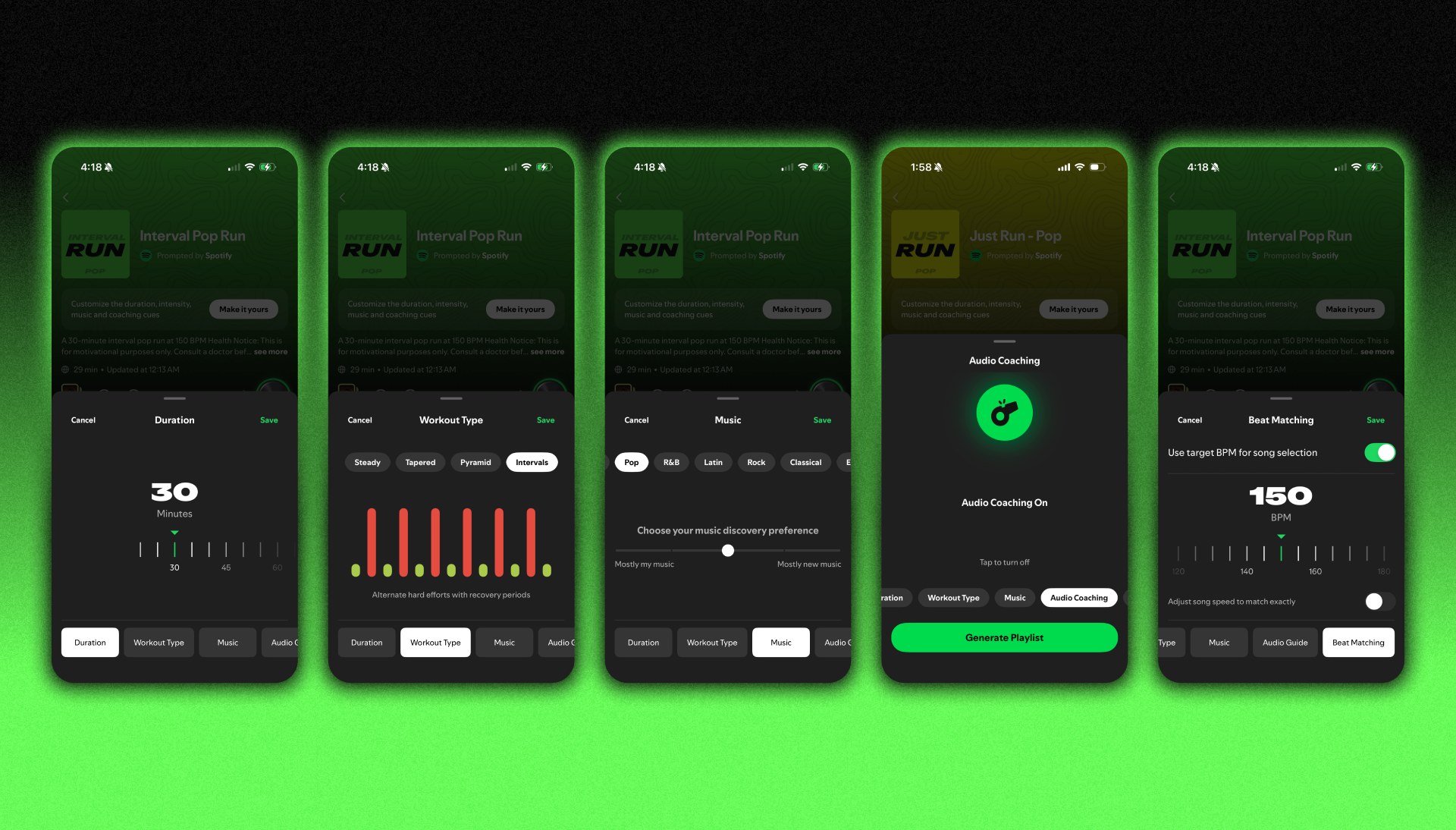
- Beat Matching: set a target BPM and Spotify picks songs at that tempo. There is also an option to adjust song speed so every track hits the BPM exactly.
- Audio coaching: optional voice cues guide you through structured sessions, a bit like a running buddy who keeps you on plan.
- Prompts: you can edit the text request behind the session in your own words, the same way Spotify’s Prompted Playlist works.
How to set up Running Mode on Spotify
- Update the Spotify app on your iPhone or Android phone and sign in with your Premium account.
- Open the Fitness hub in Spotify and look for Running Mode.
- Pick one of the 25 presets. If you just want to get out the door, Just Run is a ready 20-minute session.
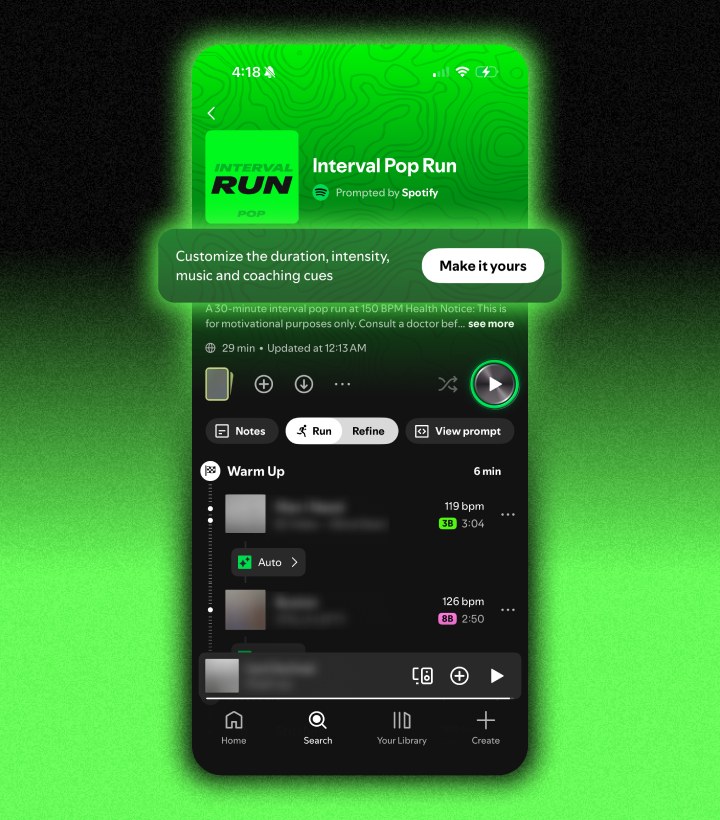
- Tap Make it yours to set the duration, workout type, music, coaching and Beat Matching.
- Start the session and press play. Save it if you like the mix, because Running Mode playlists refresh daily.
Running Mode settings explained
| Setting | What it controls | Useful tip |
|---|---|---|
| Duration | Session length from 10 to 90 minutes | Match it to your usual route so the cooldown lands near home |
| Workout type | Intervals, pyramids, easy runs and longer or advanced sessions | Intervals suit a short weekday run; pyramids suit a steady build |
| Music | Genre, plus a slider from your own music to mostly new music | Slide towards new music if your usual mix feels stale |
| Prompt | The text request behind the playlist | Be specific about language, era or song length |
| Beat Matching | Target tempo in BPM | Choose a comfortable tempo for your own run |
| Audio coaching | Optional English voice cues | Turn it off if you only want music |
Spotify says 160 BPM is the most popular setting. That is a listening preference, not a target every runner needs to hit. Beat Matching follows the tempo you select; leave song-speed adjustment off if you prefer each track at its original speed.
Getting Indian music into your runs
The genres Spotify mentions are pop, EDM, country and hip-hop. The prompt is where Indian listeners can take control. Tap View prompt and describe what you want, for example “upbeat Hindi and Punjabi songs for a morning run” or “Tamil film songs I haven’t played this year”. These are prompts to try, rather than a guarantee that every track will match your language request. Check the generated mix before starting.
The coaching is a different story. Spotify only lists English audio cues, so there is no Hindi or regional-language coaching for now.
Spotify Running Mode in India: price and who gets it
Running Mode is part of Spotify Premium, so free users will not see it, although Spotify’s wider Fitness hub does include curated workout playlists and creator workouts for free accounts. Spotify describes access as being for eligible Premium users; check whether Running Mode appears on your account before subscribing specifically for it.
Spotify’s India Premium page lists Standard at ₹139 a month or ₹1,390 a year, Platinum at ₹299 a month for up to three people at the same address, and Student at ₹69 a month. An introductory Standard offer costs ₹99 for three months, then ₹139 a month, for people who have not tried Premium before. Spotify lists an offer end date of 15 December 2026. Unlike Spotify Audiobooks+ in India, which is a paid add-on, Running Mode is included in the base subscription.
If you plan to share a multi-member plan with family, our explainer on Spotify QR code verification covers how Spotify checks that members live together.
What Running Mode does not do
Spotify describes Running Mode as a soundtrack built around your chosen duration, workout and BPM. Those music settings are not measurements of your distance, pace or heart rate. Keep using a fitness app or watch if you want a record of the run.
If you are shopping for a tracker, our list of the best smartwatches under ₹10,000 compares budget options; check the tracking features of the specific model.
Is it worth trying?
For an existing Premium subscriber, Running Mode is worth trying if building a running playlist feels like a chore. The useful part is setting the session’s shape before you leave, with music and optional cues arranged around it. You can keep your usual workout playlists too.
Start with a preset and a comfortable tempo, then adjust the music if the first mix misses your taste. Free users should weigh the full Premium subscription rather than paying just for one playlist feature.