
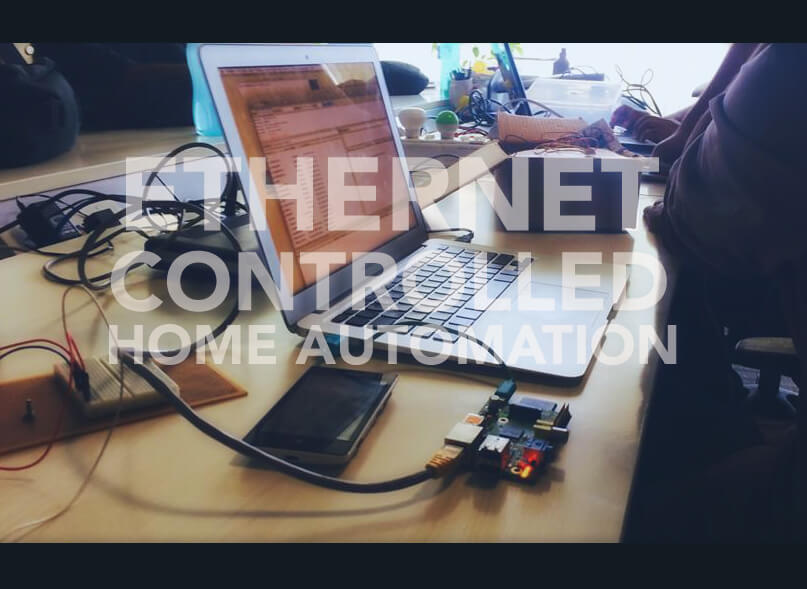
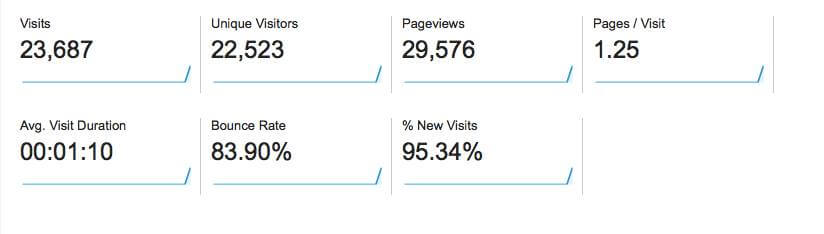
This project has been implemented for quite a while and lot of improvements have been made since the original demo which has a lot of functions at Arduino Day 2014 at Chennai. I decided to make this code open source after a lot of requests came in after I opened up my room up to the Internet, allowing anyone to control the lights in my room through a browser. Will you believe me if i told you i received over 22,523 visitors in just 2 days?
This guide is just the tip of the ice berg to build a complete home automation project using Arduino. In the coming months, we will build a complete home automation project which will include a lot more features. In this, we will build a ethernet controlled home automation to control 3 LED’s or switches in your room.
If you’re new to the world of Arduino, Check out our Getting started guide for Arduino.
Hardware Needed :
- Arduino UNO R3
- Ethernet Shield – What are Arduino Shields?
- LED’s,Relay
- LM35 (Temperature Sensor)
- Light-Dependent Resistor (LDR)
Pin’s :
- LED’s : Digital Pin’s 4,5,6
- LM35 : Analog Pin 2
- Light Dependent Resistor : Analog Pin 3
Arduino Sketch :
#include  // FOR HTHE THERNET LIBRARY
#include
include  // FOR SENDING IR COMMANDS
IRsend irsend; // SEDNDING IR CODES

// IR VALUES

unsigned int AC_ON1[60]={8450,4100,600,1450,650,400,600,450,600,450,600,1500,600,400,650,400,600,450,600,450,600,450,600,450,600,400,650,400,600,450,600,450,600,450,600,400,650,400,650,1450,600,1500,600,400,650,1450,600,450,600,450,600,450,550,1500,600,1500,600,1500,600};
unsigned int AC_OFF1[60]={8450,4050,600,1500,600,450,600,450,600,400,650,1450,600,450,600,450,600,400,650,1450,600,1500,600,450,600,400,650,400,600,450,600,450,600,450,600,450,600,400,650,400,600,450,600,450,600,1500,600,400,650,1450,600,450,600,450,600,400,650,1450,600};
unsigned int chUp1[36]={500,200,200,250,200,550,250,350,250,500,250,200,250,200,250,200,200,250,150,600,200,550,250,350,250,700,200,250,200,550,250,200,200,250,200};
unsigned int chDw1[36]={500,200,200,200,250,550,250,350,250,500,250,250,150,250,200,250,200,200,250,200,200,550,250,350,250,700,250,200,250,500,250,200,250,350,250};
unsigned int Source1[67]={4550,4500,600,1650,650,1600,650,1600,650,500,600,500,650,500,600,550,600,500,600,1650,650,1600,650,1600,650,500,600,500,650,500,600,550,600,500,650,1600,650,500,600,500,650,500,600,500,650,500,600,500,600,550,600,550,600,1650,600,1650,600,1650,600,1650,650,1600,600,1650,650,1600,650};

// LED STUFF

boolean a=0;// LED 1 STATUS
boolean b=0;// LED 2 STATUS
boolean c=0;// SWITCH CASE
boolean d=0;// LED 3 STATUS
float temp_val = 0; //  TEMPERATUERE VALUE
int ldr_val = 0; // LIGHT INTENSITY VALUE
boolean reading = false; //ETHERNET

// ETHERNET SETTINGS

 byte ip[] = { 192, 168, 1, 221 };
 byte gateway[] = { 192, 168, 1, 1 };
 byte subnet[] = { 255, 255, 255, 0 };
 byte mac[] = { 0xDE, 0xAD, 0xBE, 0xEF, 0xFE, 0xED };
 EthernetServer server = EthernetServer(80); //port 80

// IR REMOTE STUFF

void AC_ON()
{
   irsend.sendRaw(AC_ON1,60,38);
   delay(20);
  }

void AC_OFF()
{
   irsend.sendRaw(AC_OFF1,60,38);
   delay(20);
  }

void chUp()
{
  for(int i = 0; i < 5; i++) {
   irsend.sendRaw(chUp1,36,38);
   delay(20);
   }
  }

void chDw()
{
  for(int i = 0; i < 10; i++) {
   irsend.sendRaw(chDw1,36,38);
   delay(20);
   }

  }

void Source()
{
   irsend.sendRaw(Source1,67,38);
   delay(20);
   Serial.print("Source changed ");

  }

void Temp()
{

}

void Ldr()
{

}

void setup(){
  Serial.begin(9600);

  pinMode(4,OUTPUT); //LED 1
  pinMode(5,OUTPUT); //LED 2
  pinMode(6,OUTPUT); //LED 3
  analogReference(INTERNAL); // Setup the Reference Voltage as Internal

  Ethernet.begin(mac);
  Ethernet.begin(mac, ip, gateway, subnet); //for manual setup

  server.begin();
  Serial.println(Ethernet.localIP());

}

void loop(){

  // listen for incoming clients, and process qequest.
  checkForClient();

}

void checkForClient(){

  EthernetClient client = server.available();

  if (client) {

    // an http request ends with a blank line
    boolean currentLineIsBlank = true;
    boolean sentHeader = false;

    while (client.connected()) {
      if (client.available()) {

        if(!sentHeader){
          // send a standard http response header
          client.println("HTTP/1.1 200 OK");
          client.println("Content-Type: text/html");
          client.println();
          sentHeader = true;
        }

        char c = client.read();

        if(reading && c == ' ') reading = false;
        if(c == '?') reading = true; //found the ?, begin reading the info

        if(reading){
          Serial.print(c);

  switch (c) {
  // CONTROLLING THE AC

  case 'O':    // -O Turn On AC
    AC_ON();
    break;
  case 'F':    // - F Turn Off AC
    AC_OFF();
    break;
  case 'U':    // - U Channel Up
    chUp();
    break;
  case 'D':    // - D Channel Down
    chDw();
    break;

 // CONTROLLING THE LEDs

  case '1':    // LED 1 ON
    if(a==0){
    digitalWrite(4,HIGH);
    client.print("Light1 Turned On ");
    a=1;}
    break;
  case '2':    // LED 1 OFF
   if(a==1){
    digitalWrite(4,LOW);
    client.print("Light1 Turned Off ");
    a=0;}
    break;

  case '3':   // LED 2 ON
    if(b==0){
    digitalWrite(5,HIGH);
    client.print("Light2 Turned On ");
    b=1;}
    break;
  case '4':    // LED 2 OFF
  if(b==1){
    digitalWrite(5,LOW);
    client.print("Light2 Turned Off ");
    b=0;}
    break;

  case '5':    // LED 3 ON
    if(d==0){
    digitalWrite(6,HIGH);
    client.print("Light2 Turned On ");
    d=1;}
    break;
  case '6':    // LED 3 OFF
  if(d==1){
    digitalWrite(6,LOW);
    client.print("Light2 Turned Off ");
    d=0;}
    break;

  // STORE THE STATUS OF THE PINS

   case '7':    // POST VALUE OF LED 1
   client.print(a);
     break;

   case '8':    // POST VALUE OF LED 2

    client.print(b);
     break;

   case '9':   // POST VALUE OF LED 3

    client.print(d);
     break;

  case 'T':    // -T Print the temperature
   {
   int sensor_val = analogRead(2); // Read the raw sensor value and store it in the variable
  temp_val = sensor_val * 0.11; // The calculated value
  client.println(temp_val); // print the temperature value to serial monitor
   }
   break;

  case 'L':    // -L Light Intensity
    {
      ldr_val = analogRead(3);// Reads a 10-bit value corresponding to the voltage applied on analog input pin 3.
      client.println(ldr_val);//
    }  break;

           }
        }

        if (c == '\n' && currentLineIsBlank)  break;

        if (c == '\n') {
          currentLineIsBlank = true;
        }else if (c != '\r') {
          currentLineIsBlank = false;
        }

      }
    }

    delay(1); // give the web browser time to receive the data
    client.stop(); // close the connection:

  }

}
The code can be cloned from my github repository as well.

Leave a Reply