
Having 0xc004f200 error ? Windows telling you about Genuine Advantage ? Wallpaper remains a black screen ?
For all you folks, Here is a quick tutorial that would take about five minutes of your time, but will help you get rid of Error-0xc004f200
We have analyzed that, KB971033 Update is the cause. Hence we begin by uninstalling this update.
Step 1 :
- Go to Windows Update
- Hit Installed Updates (link at the bottom left corner). If that link isn’t there, hit “View update history” and hit the “Installed updates” link at the top.
- Scroll down to the section titled “Microsoft Windows” and look for update KB971033.
- Right click it and hit “Uninstall”. Hit “Okay”.
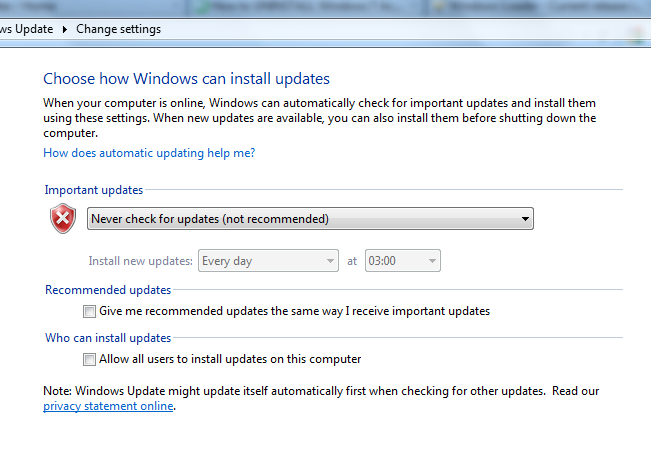
- Go to Control panel > Windows update > Change setting and select “Never check for updates”
-
Reboot your computer.
It must look something like this :
Step 2
- Download Windows Loader from here.
- Extract it and Open and hit Install.
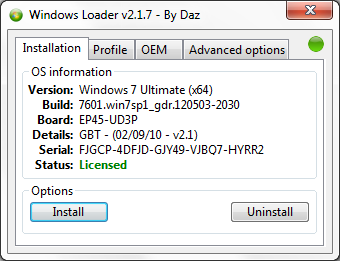
- Reboot your System Again
Once, system restarts, you will get the same old screen, this time click Resolve Online Now and follow the official steps to validate your windows. Microsoft will prompt you to install a file which will then legitimize your windows with the New Loader. Reboot.
This is just a post about how you can remove the Windows NOT Genuine Notification only for informative purposes. We will not be responsible for any problems that occur to your computer. We advise you to buy a Original License of Windows.





Leave a Reply