If you pay for Google AI Pro or Ultra, the model menu in the Gemini app just changed. Gemini 4 Neon is now the main upgrade over the everyday Hydrogen model, and it takes the slot that Gemini 4 Argon held for the last month. Free users and Google AI Plus subscribers do not get it.
Google announced Neon on 18 November. It sits between Hydrogen, the fast model everyone can use, and Carbon, the heavyweight reserved for Ultra. Google pitches it as close to Carbon’s quality on long, document-heavy work, at a lower cost per task and a faster pace. If you are on Pro, it is worth knowing when to pick it, because it uses more of your allowance than Hydrogen.
Who gets Gemini 4 Neon
Google’s About Gemini models help page, which applies to personal Google accounts, lays out the new menu by plan:
| Google AI plan | Models in Chat | Models in Tasks |
|---|---|---|
| No plan (free) | Auto | Hydrogen |
| Google AI Plus | Auto, Hydrogen | Hydrogen |
| Google AI Pro | Auto, Hydrogen, Neon | Hydrogen, Neon |
| Google AI Ultra | Auto, Hydrogen, Neon, Carbon | Hydrogen, Neon, Carbon |
Google’s current model table lists Neon for Pro and Ultra, while Argon no longer appears. If you used Gemini 4 Argon, check the model picker for the options now available on your account. Work and school accounts follow their Workspace licence instead.
Indian users who claimed Jio’s 18-month Google AI Pro offer are on the Pro plan, so Neon should show up for them too as the rollout reaches their account. That offer is closed to new claims, as we explained in our piece on the Jio Google AI Pro offer.
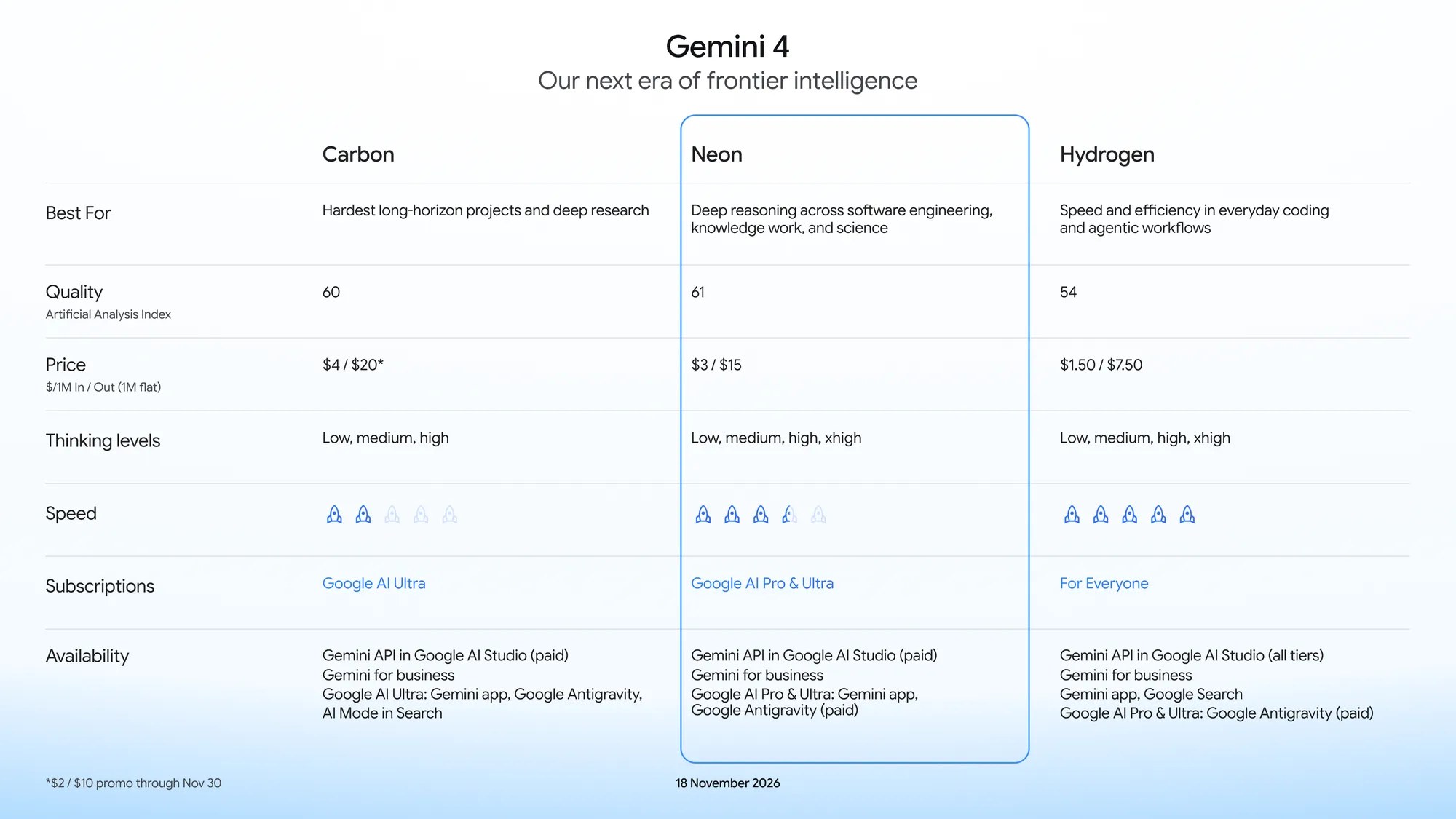
Neon, Hydrogen or Carbon: which one to pick
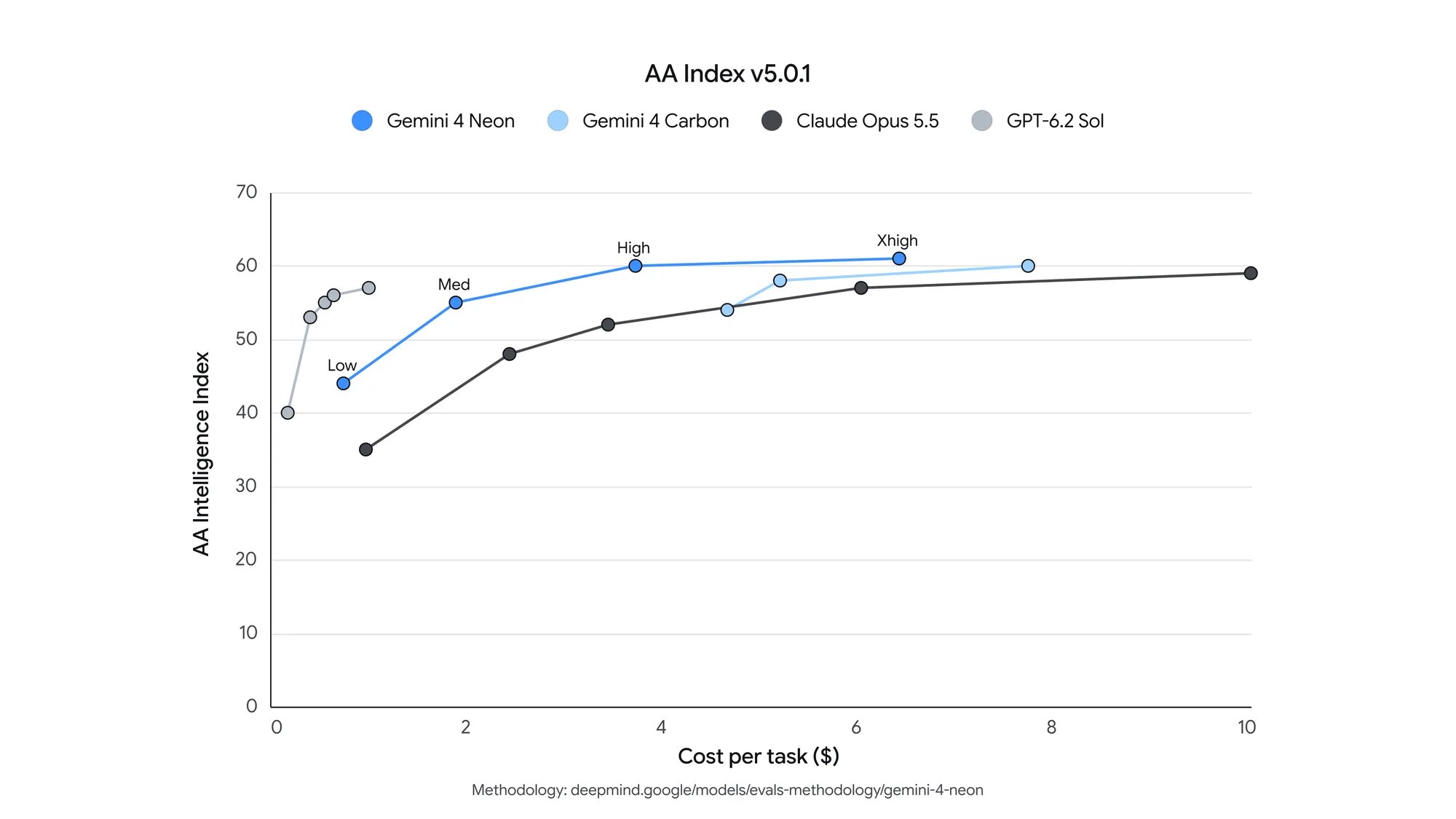
Google describes Hydrogen as the fast model for everyday chats, Carbon as its strongest model for the hardest long-horizon problems, and Neon as the balance between the two. Google reports an Artificial Analysis Intelligence Index score of 61 for Neon at its API-only Extra High thinking level. That score is not a benchmark of the Gemini app’s Low, Medium or High settings.
In practice, keep Hydrogen or Auto for quick replies, email drafts and simple questions. Switch to Neon when you hand Gemini real material to work through: a long PDF, a spreadsheet of expenses, several receipts or a research brief that needs current web sources. Google’s examples are exactly that kind of chore, such as working out why a utility bill spiked from your billing statements, or cross-checking receipts and documents before asking for a refund.
Neon also powers Tasks for Pro and Ultra users, so multi-step jobs can run on it. Google says this gets work done more quickly than with larger models while stretching your usage limits further. Free Tasks in India stay on Hydrogen, which we covered in Gemini Tasks free in India.
How to switch to Neon and set the thinking level
- Open the Gemini app or go to gemini.google.com and sign in with your Pro or Ultra account.
- Tap or click the model name at the bottom of the chat box.
- Choose Gemini 4 Neon. Models with a lock icon need a higher plan.
- Pick a thinking level: Low, Medium or High.
The thinking level matters more than it looks. Google’s help page says that if you pick a model without choosing a level, it defaults to Low, which gives fast, concise answers. For a 50-page report or a tricky comparison, set High so the model reasons through the steps. Your choice sticks for that conversation, including when you come back to it later.
The app offers three levels. Developers calling Neon through the Gemini API also get an Extra High (xhigh) setting, and the API defaults to High rather than Low.
Usage limits: what Neon costs you
Gemini’s limits are compute-based, not a fixed number of prompts. Google says your allowance refreshes every five hours until you hit a weekly cap, and that more advanced models and higher thinking levels use more of it. Long chats cost more too, because Gemini re-reads the conversation each time, so start a fresh chat when you change topic.
| Plan | Usage limit | Context window in the app |
|---|---|---|
| Free | Standard | 32k tokens |
| Google AI Plus | 2x standard | 128k tokens |
| Google AI Pro | 4x standard | 1 million tokens |
| Google AI Ultra | 5x or 20x Pro, depending on subscription | 1 million tokens |
When a paid user reaches their limit, chats can continue with Google’s fast, lightweight model until the allowance refreshes. To see where you stand on the web, open Settings at the bottom left and choose Usage Limits.
For short questions, Auto conserves your allowance. Higher thinking levels are more useful when a task needs several reasoning steps, rather than a quick reply.
For developers: API price and limits
On the paid tier of the Gemini API, Neon costs $3 per million input tokens and $15 per million output tokens, with cached input at $0.15 per million. That is double Hydrogen’s $1.50 and $7.50. Carbon’s promotional rates are $2 per million input tokens and $10 per million output tokens through 30 November 2026, lower than Neon’s token rates during that offer. Carbon’s standard $4 and $20 rates begin on 1 December. Google also says Neon’s cost per task at the default High level is 32 percent lower than Carbon’s.
API usage is billed separately from a Google AI Pro or Ultra subscription. The model ID is gemini-4-neon, with a unified 1 million-token context window and default synchronous outputs up to 65,536 tokens. Paid Pro and Ultra subscribers can also use Neon in Google Antigravity, where Google pitches it as an orchestrator directing Hydrogen subagents.
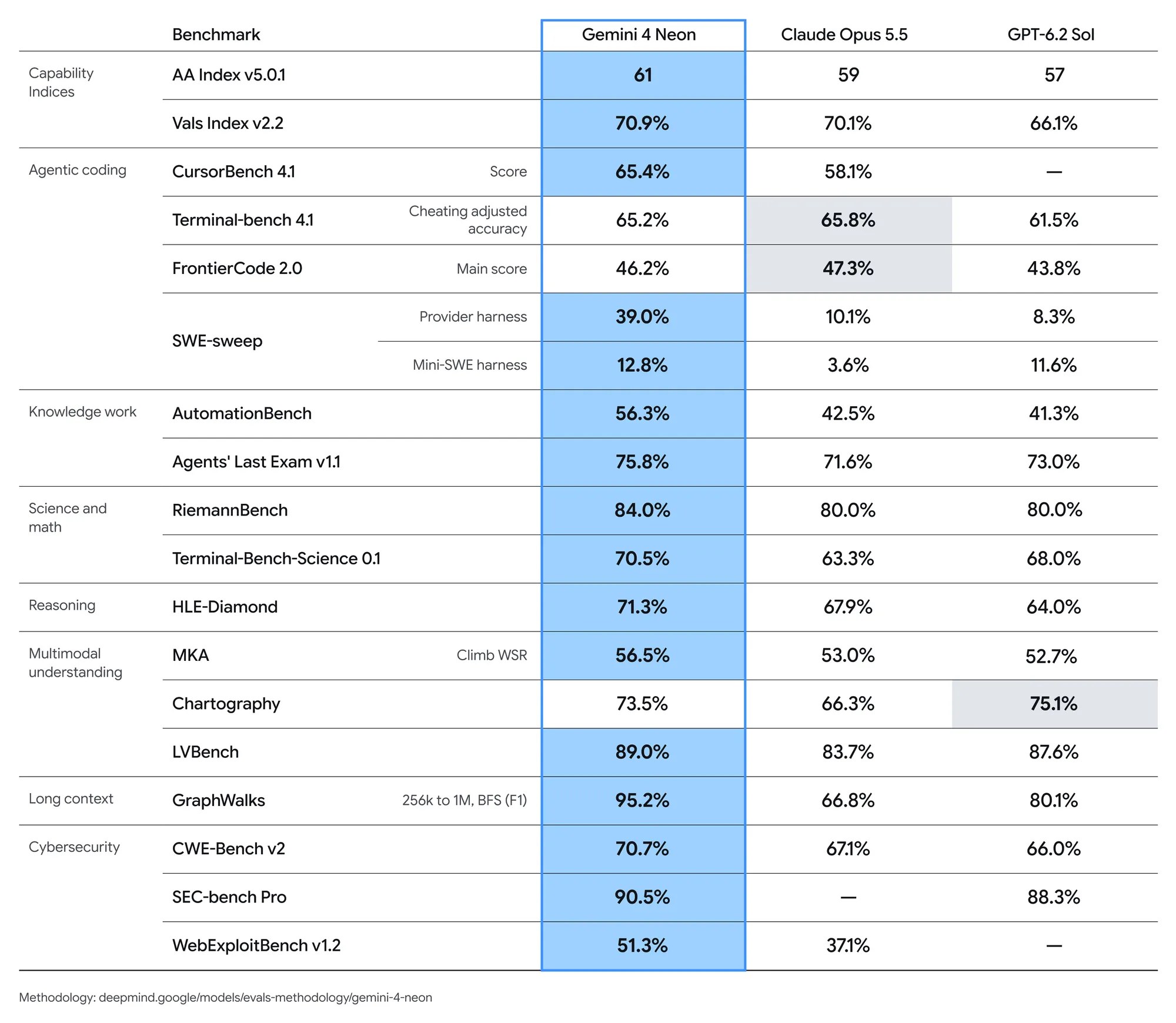
Treat those benchmarks as Google’s claims until independent testing catches up. Google’s own table shows Claude Opus 5.5 slightly ahead on Terminal-Bench 4.1 and FrontierCode 2.0. The lower fabrication rate it reports comes from internal Antigravity testing, so keep checking figures and citations in anything Neon writes for you.
Should you upgrade to Pro for Neon?
Not on Neon alone. Free users already get Hydrogen for some prompts through Auto, plus free Tasks in India, and that covers most everyday questions. Pro makes sense if you regularly feed Gemini long documents, spreadsheets or research jobs, because you get Neon, the 1 million token window and four times the standard limits together. If you already pay for Pro, switch to Neon on your next serious task and compare it with Hydrogen. Our Gemini 4 Hydrogen explainer covers what the free and Plus tiers get.
FAQ
Is Gemini 4 Neon free?
No. In the Gemini app, Neon is limited to Google AI Pro and Ultra subscribers. Free users use Auto in Chat; Plus users can also select Hydrogen. Neither plan includes Neon.
Does Gemini 4 Neon replace Argon?
Yes. Argon is no longer listed in Google’s model table for the Gemini app, and Neon takes its place for Pro and Ultra users.
What thinking levels does Neon offer in the Gemini app?
Low, Medium and High. If you do not choose one, it defaults to Low. The Extra High level is available only through the Gemini API.
- SourceGemini API: Pricing