

ChatGPT Intelligent UI lets GPT-6 answer some questions with diagrams, charts, buttons and small interactive tools instead of text alone. It is for the Chat tab and does not require a special prompt. Free and Go access is less clear: OpenAI’s launch post said GPT-6 Luna would reach those plans from October 8, but the current Help page still lists GPT-5.6 Luna.
What ChatGPT Intelligent UI adds
Ask ChatGPT to explain a topic, compare options or help plan something, and the reply may include an interactive diagram, chart, form or buttons you can tap. OpenAI’s examples include exploring how a bicycle works, comparing choices side by side, adjusting inputs and creating a bill splitter or calculator in the chat.
The format depends on the question. A simple question can still get a plain text answer, and you do not have to ask for “Intelligent UI” by name. OpenAI says the interface is built from native components that can appear as the model generates them, rather than waiting for one finished visual.
That could make a useful difference for things such as a trip plan, a phone comparison or a maths explanation. Instead of scrolling through a long reply, you may be able to change an input or tap a part of a diagram. The feature is a new way to present an answer, not a guarantee that every response will be interactive.
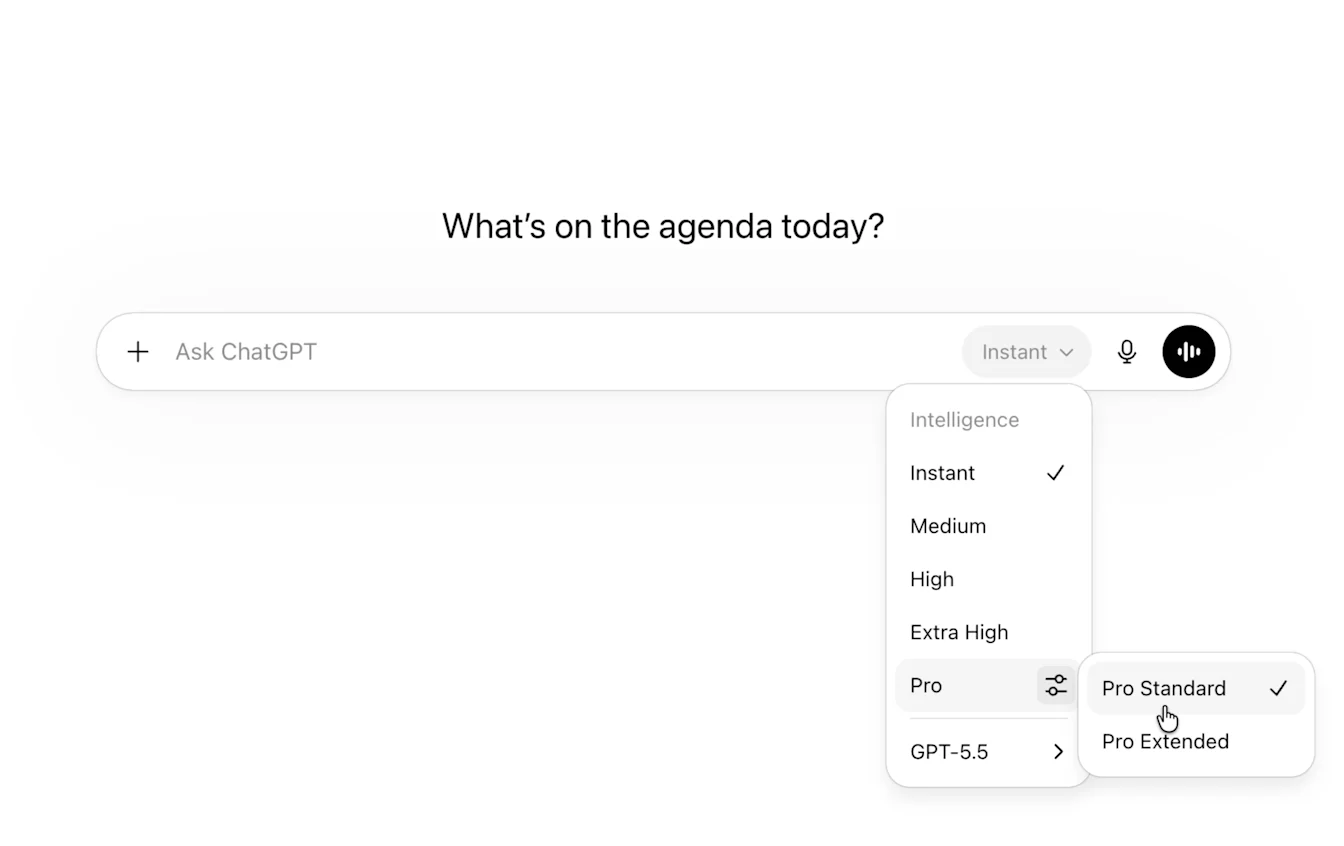
GPT-6 access: OpenAI’s launch and Help pages differ
OpenAI’s October 7 launch announcement said GPT-6 with Intelligent UI would start rolling out to Plus, Pro, Business and Enterprise that day, then expand to Free and Go from October 8. It said paid plans would get GPT-6 Sol and Free and Go would get GPT-6 Luna.
| Where to check | What OpenAI currently says |
|---|---|
| October 7 launch announcement | Free and Go rollout with GPT-6 Luna was due to begin October 8. |
| Current GPT-6 Help page | GPT-6 is rolling out to eligible paid users. Free and Go use GPT-5.6 Luna. |
Those statements do not match. The current Help page is the support reference, so Free and Go users should not assume GPT-6 or Intelligent UI is available to them yet. OpenAI says access depends on the rollout and plan. Check your model picker if the feature is missing.
For the broader model differences, see our GPT-6 Sol vs GPT-6 Luna explainer.
What you need to use the interactive replies
OpenAI Help says Intelligent UI is rolling out on the web and supported, up-to-date apps when you use GPT-6 at Instant, Medium, High or Extra High. It is not available with Pro effort, which uses GPT-6 Pro powered by GPT-6 Astra. The older ChatGPT desktop apps for macOS and Windows do not support the feature, so use ChatGPT on the web or update the mobile app.
There is no separate Intelligent UI allowance. Your usual model, tool and plan limits still apply. If a visual response feels distracting, open ChatGPT’s web settings and turn off Layout and visuals. That reduces visual elements, but some may still appear; it is not a full text-only switch.
What changes for Work and Codex?
OpenAI says the Intelligent UI launch applies to Chat, not the Work or Codex model line-up. Its Help page also says availability in Work and Codex is unchanged. If you use those products, this Chat update does not by itself mean their models or interfaces have changed.
Is Intelligent UI useful in everyday chats?
It should help most when the answer is easier to understand by seeing or adjusting something: comparing two phones, following a route, changing a budget or exploring a diagram. For a quick fact or a paragraph you plan to copy, a normal text reply may still be better.
My take: the interesting change is not that ChatGPT can make a chart. It is that the chat can become a small tool when the question calls for one. Whether you get that experience today depends on your plan, model, app and rollout status. Free and Go users in particular should check the model picker rather than rely on the launch-day promise.
Frequently asked questions
Do I need a special prompt for ChatGPT Intelligent UI?
No. OpenAI says ChatGPT chooses a useful format for the question. Plain text replies are still possible.
Can I turn off visual replies?
On the web, turn off Layout and visuals in Settings to reduce them. OpenAI notes that some visuals may still appear.
Does Intelligent UI work in the ChatGPT desktop app?
OpenAI says the older macOS and Windows desktop apps do not support it. Use ChatGPT on the web or an updated supported mobile app.
Are Free and Go users getting GPT-6 Luna?
OpenAI’s October 7 announcement said that rollout would start October 8. Its current Help page says Free and Go use GPT-5.6 Luna, so check the model picker for the latest access on your account.


